 our blog
designing openType‐features UI /intro
23 June 2015, 09:24
a bit of a situation
First things first. It is quite likely that when you are reading this, you know what openType features in fonts are. But just in case you don’t, here is a friendly, illustrated explanation of some of the features, without putting you straight into corporate specification hell. The reason I said ‘some’ will become clear below.
What is interesting is that there is a riot going on. The 800‑pound gorillas of (typo‐)graphical software—the adobe creative suite applications—have such bad and disparate UI for handling openType features that a grass‐roots protest movement started among typographers and font designers to do something about it. What followed was a a petition and a hasty promise by adobe to do better—in the future.
meanwhile in Toronto…
These events prodded Nathan Willis into action, because ‘open‐source applications aren’t any better in this regard.’ He organised a openType workshop at this year’s LGM to get a process started to change that. I went there because this is smack in the middle of one of my fields of specialisation: interaction for creatives. As you can read in Nathan’s report, I got immediately drawn into the UI discussion and now we have a loose‐knit project.
The contents and vibe of the questions, and my answers, in the UI discussion all pointed in a certain direction, that I was only able to name a day later: harmonised openType features for all F/LOSS (typo‐)graphical applications definitely has an infrastructure component.
the untouchables
Pure infrastructure—e.g. tap water, electricity, telecoms—offers its designers some unique challenges:
- everybody uses it
- and everybody’s needs are equally important; there is no opportunity to optimise the design for the specific needs of user groups.
- nobody cares
- usage is ubiquitous, i.e. we all do not even register that we are using this stuff all the time—until it stops working, then we miss it a hundred times a day. This makes it very hard to research; no recollection, feelings or values are connected to infrastructure, just entitlement.
- anyplace, anywhere, anytime
- there is no specific contextual information to work with: why is it used; what is the goal; what does it mean in the overall scheme of things; how much is a little, and a lot; it is used sparsely, all the time, at regular intervals, in bursts? It all depends and it all happens. Just deal with it, all of it.
- millions of use cases
- (not that I consider use cases a method that contributes positively to any software project, but‐) in the case of infrastructure something funny and instructive happens: after a week or two of exploration and mapping, the number of use cases grows exponentially towards a million and… keeps on growing. I have seen this happen, it is like peeling an onion and for every layer you peel off, the number goes up by an order of magnitude. These millions of use cases are an expression of everybody using it anyplace, anywhere, anytime.
- heterogeneous capabilities
- this is not always the case, but what is available can vary, a lot. For instance public transport: how many connections (incl. zero) are available for a given trip—and how fast, frequent and comfortable these are—is set by the network routes and timetables. An asked‑for capability is on offer, or not. It all depends and it all happens. Just deal with it, all of it.
I have worked as design lead on two infrastructure projects. One was Nokia dual‑SIM, the other openPrinting, where we designed printing dialogs for all linux users (everyone), as used in 10.000 applications (anyplace, anywhere, anytime), connected to 10.000 different printer models (heterogeneous capabilities). I dubbed it the project with five million use cases.
Ah, and since both application and printer configure the available options of the print dialog, there are potentially 100 million configurations. Even if in reality the variability is far less (say, just 1% on both application and printer side; i.e. 100 significantly different printer models and 100 apps that add serious, vital printing options), then it is still an overwhelming 10.000 configurations.
drowning, not waving
In my experience, designing infrastructure is very demanding. All the time one switches between making the big, abstract plan for everything, and designing, minutely, one of many details in complete isolation. Mid‑level interaction design, the journeyman, run‑of‐the‑mill, lay‑out‐a‑screen level, is completely missing.
It is like landscaping a featureless dessert, where every grain of sand is a detail that has to be dealt with. With no focus on particular users, no basis for research, no context, no just‑design‐the‐example, millions of use cases and highly variable capabilities, I have seen very capable design colleagues lose their bearings and give up.
back at the ranch
Enough war stories. How large is this infrastructure component of openType features in (typo‐)graphical software? Let’s check the list:
- everybody uses it—nope. Whether the user groups turn out to be defined real narrow or quite wide—a matter of vision—they will have in common that all of them know their typesetting. That is a craft, not common knowledge.
- nobody cares—well, soon they won’t. Right now there is upheaval because nothing is working. As soon as users get a working solution in the programs they use, it will become as interesting as the streetlights in your street.
- anyplace, anywhere, anytime—right on! This has to work in (typo‐)graphical software; all of it—even the kind I have never heard of, or that will be invented in five years from now. All we know, is that serious typesetting is performed there by users, on any length of text selection.
- millions of use cases—not quite. The limited user group provides the breaks here. But there is no such limit from the application side; on the contrary: most of these are (open‐ended) tools for creatives. Just thinking about how flexible a medium text is, for information or shapes, gives me the confidence to say that 10.000 use cases could be compiled, if someone would sit down and do it.
- heterogeneous capabilities—hell yeah! OpenType‐features support in fonts is all over the place and not just because of negligence. First there is the kaleidoscopic diversity of scripts used around the world, most of which you and I have never heard of. Latin script is just the tip of the iceberg. Furthermore, what is supported, and how each supported feature is actually realised, is completely up to the font designer. The openType‐features standard is open‐ended and creates opportunities for adding sophistication. This is only limited by the combined imagination of the font design community.
Adding that up, we get a score of 3½ out of 5. By doing this exercise I have just found out that openType features in (typo‐)graphical software is 70% infrastructural. This is what I meant with that it is a special, complicated project.
structure—the future
In projects like these structuring the design work is make‑or‐break; either we set off in the right direction, or never get to any destination—not even a wrong one. The structure I use is no secret. Here is my adaptation for this project:
A product vision is not that easy to formulate for pure infrastructure; it tends to shrink towards ‘because it’s there.’ For instance at openPrinting the vision was ‘printing that just works.’ I still regret not having twisted some arms to get a value statement added to that. There were times that this value void was keeping us from creating true next‐generation solutions.
Apart from ‘what’s the value?’ also ‘who is this for?’ needs to be clarified; as we saw earlier, openType features is not for everyone. The identity question, ‘what is it we are making?’ may be a lot less spectacular, but it needs to be agreed. I will take this to the Create mailing list first, mainly to find out who are the ‘fish that swim upfront’, i.e. the people with vision and drive. Step two is an online vision session, resulting in a defined vision.
The deliverable is a to‑the‐point vision statement. If you want to get a good picture of what that entails, then I recommend you read this super‐informative blog post. Bonus: it is completely font‐related.
we want the funk, the whole funk, nothing but the funk
A deep understanding of the functionality is the key to success in this project. I already got burned once with openType features in the Metapolator project. Several font designers told me: ‘it is only a bunch of substitution rules.’ Until it turned out it isn’t. Then at the LGM meeting another surprise complication surfaced. Later I briefly check the specification and there is yet another.
This is what I meant before with that friendly page explaining some of the features. I do not trust it to be complete (and it is only Latin‐centric, anyway). As interaction architect I will have to be completely on top of the functionality, never having to rely on someone else to explain me what ‘is in the box.’ This means knowing the openType standards.
Central to it is the feature tags specification and the feature definition syntax. This contains both the material for understanding of how complicated it all can get and the structures that I can use to formulate UI solutions. It is one of the few aspects that are firm and finite in this project.
The deliverable is a functionality overview, written up in the project wiki.
talking heads
I will do user research, say interview half a dozen users, to gain insight into the act of typesetting, the other aspect that is firm and finite in this project. Which users to recruit depends on what is defined in the product vision. Note that the focus is on the essence of typesetting, while ignoring its specific role in the different (typo‐)graphical applications, and not get swamped by the latter’s diversity.
The deliverable is notes of interest from the interviews, written up in the wiki.
I look forward to an exchange with F/LOSS (typo‐)graphical applications via the Create list. This is not intended to get some kind of inventory of all the apps and how different they are. In this project that is taken as abstract and infinite—the good old infrastructural way.
What I want to find out is in how many different ways openType features must, or can, be integrated in the UIs of (typo‐)graphical applications. In blunt terms: how much space is there available for this stuff, what shape does it have and what is the duty cycle (permanently displayed, or a pop‑up, or…)? These diverse application needs are clustered into just enough UI models (say, six) and used below.
The deliverable is the UI models, written up in the wiki.
getting an eyeful
Then it is time to do an expert evaluation of existing openType‐features UI and all these UI ideas offered by users when the petition did its rounds. All of these get evaluated against—
- the product vision: does it realise the goals? Is it appropriate for the defined user groups?
- the functionality: can it cope with the heterogeneous capabilities?
- the user research: how tuned is it for the essence of typesetting?
- the UI models: how well does it fit with each model?
All of it gets analysed, then sorted into the good, the bad and the ugly. There will be a tiny amount of gold, mostly in the form ideas and intentions—not really what one would call a design—and a large catalog of what exactly not to do.
The deliverable is notes of interest from the evaluation, written up in the wiki.
warp drive
Then comes the moment to stop looking backwards and start working forwards; to start creating the future. First a solutions model is made. This is a combination of a broad‐strokes solution that cuts the project down to manageable proportions and a defined approach how to deal with the rest, the more detailed design work.
The next stage is to design a generic solution, one that already deals with all of it, all the hairy stuff: text selections of any length, all the heterogeneous capabilities, the typesetting workflow, clear representation of all openType features available and their current state. This will be specified in a wiki, in the form of UI patterns.
With the generic solution in place it will be real clear for the central software library in this small universe, HarfBuzz, which new capabilities it will need to offer to F/LOSS (typo‐)graphical software.
home straight
The final design phase is to work out the generic solution for each UI model. These will still be toolkit agnostic (not specific for KDE or gnome) and, btw, for desktop UI‐only (touch is a whole ’nother kettle of fish). This will also be specified in the wiki.
With this, every (typo‐)graphical software project can go to the wiki, pick a UI model that most matches their own UI structure and see a concrete UI design that, with a minimum of adaptations, they can implement in their own application. They will find that HarfBuzz fully supports their implementation.
While working on Metapolator in the last year I had good experience with sharing what I was doing almost every day I was working on it, through its community. There were encouragement, ideas, discussions, petitions and corrections—all useful. I think this can be replicated on the Create list.
Labels: design stage, fundamental, infrastructure, openType, practical, process, product phase, product vision, top story



designing interaction for creative pros /1
7 May 2015, 19:23
The lecture coincided with the launch of the demo of Metapolator, a project I have been working on since LGM 2014. All the practical examples will be from that project and my designs for it.
see what I mean?
‘So what’s Metapolator?’ you might ask. Well, there is a definition for that:
‘Metapolator is an open web tool for making many fonts. It supports working in a font design space, instead of one glyph, one face, at a time.
‘With Metapolator, “pro” font designers are able to create and edit fonts and font families much faster, with inherent consistency. They gain unique exploration possibilities and the tools to quickly adapt typefaces to different media and domains of use.
‘With Metapolator, typographers gain the possibility to change existing fonts—or even create new ones—to their needs.
‘Metapolator is extendible through plugins and custom specimens. It contains all the tools and fine control that designers need to finish a font.’
theme time
That is the product vision of Metapolator, which I helped to define the moment I got involved with the project. You can read all about that in the making‑of.
One of the key questions answered in a product vision is: who is this for? And with that, I have arrived at what this blog post is about:
Products need a clear, narrow definition of their target users groups. Software for creatives needs a clear definition whether it is for professionals, or not.
Checking the vision, we see that Metapolator user groups are well defined. They are ‘“pro” font designers’ and ‘typographers.’ The former are pro by definition and the latter come with their own full set of baggage; they are pro by implication.
define it like a pro
But what does pro actually mean? And why is it in quotes in the Metapolator vision? Well, the rather down‐to‐earth definition of professional—earning money with an occupation—is not helping us here. There are many making‐the‐rent professionals who are terrible hacks at what they do.
Instead it is useful to think of pros as those who have mastered a craft—a creative craft in our case. Examples of these are drawing, painting; photographing, filming, writing, animating, and editing these; sewing, the list goes on and on.
Making software for creative pros means making it for those who have worked at least 10.000 hours in that field, honing their craft. And also making it for for the apprentices and journeymen who are working to get there. These two groups do not need special ‘training wheels’ modes; they just need to get their hands dirty with the real thing.
the point
The real world just called and left a message:
making it for pros comes at a price.
First of all, it is very demanding—I will cover this in the follow‑up posts. Second, it puts some real limits on who else you can make it for. Making it for…
- pros
- is perfectly focussed, to meet those demanding needs.
- pros + enthusiasts
- (the latter also known as prosumers.) This compromises how good one can make it for pros; better keep in check how sprawling that enthusiast faction is allowed to be.
pros + enthusiasts + casual users- forget it, because pros and casual have diametrically opposite needs. There is no room in the UI for both, and with room I mean screen real estate and communication bandwidth.
pros + casual users- for the same reasons one can royally forget about this one too. Enough said.
the fall‐out
You might think: ‘duh, that speaks for itself, just make the right choice and roll with it.’ If it was only that easy. My experience has been that projects really do not like to commit here, especially when they know the consequences outlined above. And when they did make a choice, I have seen the natural tendency to worm out of it later.
I guess that having clear goals is scary for quite a few folks. Having focussed user groups means saying ‘we don’t care about you’ to vast groups of people. Only the visionary think of that as positive.
Furthermore, clear goals are a fast and effective tool to weed out bad ideas, on an industrial scale. That’s good for the product, but upsets the people who came up with these ideas. So they renegotiate on the clear goals, attacking the root of the rejection.
no fudging!
In short: define it; is your software for creatives made for pros, or not? Then compile a set of coherent user groups. In the case of Metapolator the ‘pro’ font designers and typographers fit together beautifully. Once defined, stick with it.
That’s it for part one. Here is part two: a tale of cars.
[editor’s note: Gee Peter, this post contains a lot of talk about pros, but where is the creative angle?] True, the gist this post is valid for all professionals. The upcoming parts will feature more ‘creative’ content, more Metapolator, and illustrations.
Labels: lecture, metapolator, practical, process, product phase, product vision
a Maslow hierarchy of software making
18 March 2014, 10:50
:
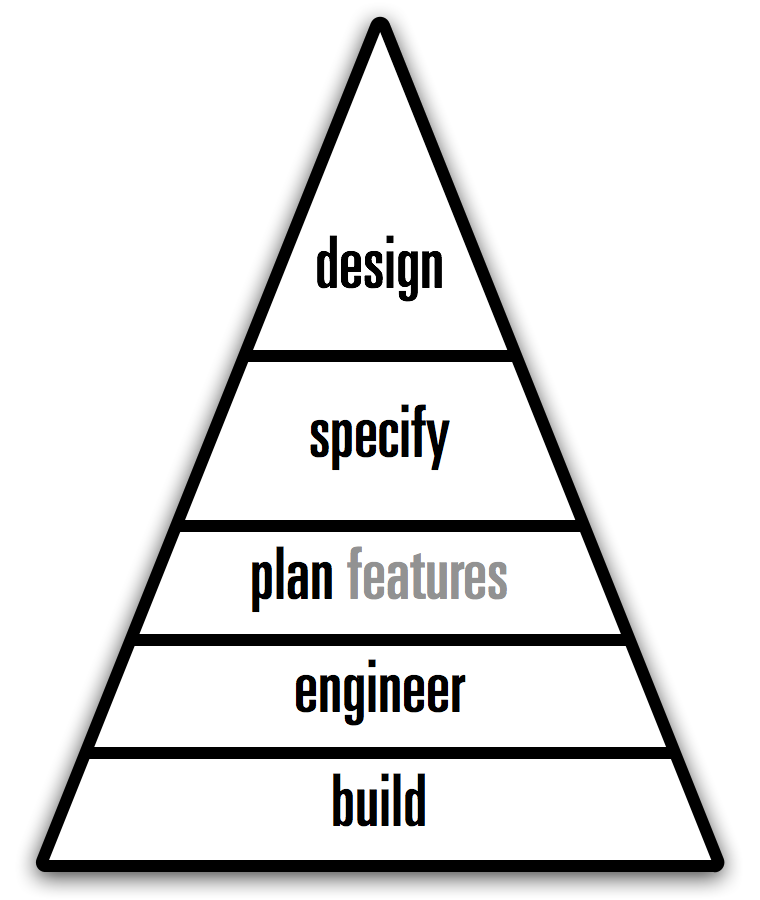
I recalled what I wrote here a while ago:
‘Everyone knows that in order to get software, it needs to get built, i.e. code developed.’
And with that I had my first, ‘physiological’ level of software making: to build. Without it, there is nothing. This is the hammer and saw level; just cut it to size and nail it together.
You would be surprised how much software is made like this—yes, also for top dollar.
moving on up
The next level is to engineer. At this point one is not just cobbling code together, there is also thought and structure involved, on a technological level. This is all about avoiding chaos, being able to scale up—in size and complexity—and code being maintainable in the future.
We can use these two levels to illustrate a common source of strife in software development outsourcing. The customer thinks they will get an engineered solution for their money; the supplier thinks they can just build whatever passes the acceptance tests.
Maslow’s second level is called safety. Somehow that matches quite well with what software engineering is about.
a giant leap
One level up is a whole new ballgame: to plan features. This requires having a product vision and picking only those features that make the product stronger, while saying ‘no’ to 95% of the features that users, marketing and engineering come up with.
This is the entry level for putting some purpose into the activity; to make software that matters. It is not easy to make it up to here; respect for those who do. It takes a visionary person, confident enough to deal firmly but correctly with all the wild impulses that come from users and engineering.
The corresponding Maslow level is called love. Indeed, to plan features is the first step of putting some love into the software you are making.
accident prune
The fourth level is to take the random factor out of software making: to specify. Define first what needs to be made, before engineering figures out how it can be built. This roots out the standard practice of the how determining what the result will be.
I am totally not a fan of heavyweight, bureaucratic specifications. Just keep in mind: the point is that a project should be able to tip the code, swap out the complete engineering crew and be confident to resurrect exactly the same software from spec—just with different bugs.
full potential
And now we reach the top, the level of complete product realisation: to design. The focus moves to product value delivery, by addressing user needs, while taking into account what is feasible with technology.
A software project that is operating smoothly on all five levels of the hierarchy is one that is delivering its full potential. It can concentrate on realising its vision and through that be a leader in its market.
Conversely, a project where one or more levels of the hierarchy are missing, or not functioning well, will spend a considerable amount of its energy on trying to fill the void(s). The organisation may not quite be able to put its finger on what is wrong, but spend a lot of communication, meetings, time and action on correcting it.
Maslow’s top level is summed up as—
‘morality, creativity, spontaneity, problem solving, lack of prejudice and acceptance of facts’
That’s a pretty good trait‐requirements list for a designer. Stated the other way around, to design is a human need of the highest level.
use it
Now we can work the diagram, in true Maslow style:
An organisation will only be motivated to fix the lowest level that is found lacking.
As we have already seen, the build level trumps anything. Problems on this level—e.g. lack of developers, or ‘physiological’ bugs (crashing)—will crowd out any other considerations. Moving up, if the engineering is found lacking, then an organisation will not be inclined to take feature‐planning, specification, or design serious.
If an organisation fails to plan features then design and/or specification initiatives will be in vain. Is the specification process found lacking? Then it will be hard for an organisation to become design‑driven.
Working the diagram, we can understand how software‐making organisations act.
postscript
Here is something I noticed when I looked at the hierarchy diagram: it doesn’t mention software or anything related, does it?
Turns out the diagram is general for any design discipline; it is a Maslow hierarchy of making anything.
Labels: fundamental, process, top story
design lessons with Daft Punk
23 May 2013, 22:51
I am sure you have noticed the Daft Punk marketing master plan that is taking over all media channels at the moment. And I admit that I am happy to consume—and inhale—anything (semi‐)intelligent that is being written about them.
Yesterday I read this Observer interview with the ‘notoriously shy French duo.’
punk rules, OK?
Below are Daft Punk quotes I lifted from the article, followed by what I associate with each. There are also a couple of cameo appearances by hit‑production legend Nile Rodgers.
‘The music that’s being done today has lost its magic and its poetry because it’s rooted in everyday life and is highly technological.’
Wow, not the most hands‑on quote to start with. But I swore that I’d present them in the order they appear in the article. With the mentioned ‘magic and poetry’, I associate fantastic design work. This means sweeping solutions, for which there needs to be at least one designer on the project with a big‐picture view.
Being constantly ‘rooted in everyday life’—e.g. relying on testing (A/B or usability); or working piecemeal, or driven by user requests, or in firefighter mode—shortens the horizons and shrinks the goals. It surely programs the project for mediocrity, i.e. humdrum, incremental solutions.
Every user has to deal every day with software that ‘is highly technological.’ Everybody thinks this sucks. Making software is highly technological when one is staring at code; when thinking about code; when taking prototyping capabilities into account; when technology informs the interaction, verbatim. Designing great interaction means not making any of these mistakes.
‘In early interviews they came across as suspicious and aloof. “It’s because you’re 18 and you feel maybe guilty: why are we chosen to do these things?” says Thomas. “There’s definitely reasons to feel less uncomfortable now. It’s one thing to say you’re going to do it and another to have done it for 20 years.”’
Now that is the voice of experience talking. The first part of it is this early phase; fresh out of school and real (work) life is starting. This suspicion of one’s own talents, entering a company, scene or industry and expecting the folks around you to be like you, see things like you. And then they don’t. Very confusing, who is wrong here?
The second part is having ‘done it for 20 years.’ If that involved a portfolio of successful work; continuous self‐development; the discovery of what a difference ‘being experienced’ makes and getting to know a few peers, then it has become more comfortable to be a designer. Just don’t get too comfortable; make sure every new project you take on challenges and develops you.
‘The only secret to being in control is to have it in the beginning. Retaining control is still hard, but obtaining control is virtually impossible.’
The first level where this holds is getting a design implemented. Quite often developers like to first put some temporary—and highly technological—interaction while they sort out the non‑UI code. The real design will be implemented later. Then time ticks away, the design lands in a drawer and the ‘temporary’ UI gets shipped.
I do not think this is a malicious trick, but it happens so often that I do not buy it anymore. The only secret to getting interaction design implemented is to do it in the beginning.
The second level is that of the overall collaboration; ‘obtaining control is virtually impossible,’ no matter how big a boost a designer has given the project. So one has to start out with control from the beginning, it has to be endowed by the project leadership. And then one has to work hard to retain it.
‘Guy‑Man, who designed the artwork, says that Thomas is the “hands‑on technician” while he is the “filter”: the man who stands back and says oui or non.’
Filter is the stuff designers are made of. In the case of interaction designers it means filtering out of all the things users say, the things they actually need. It means saying non to many things that are simply technologically possible, but useless, and oui to exactly that what realises the product, addresses users needs and is, yes, technologically possible.
Being the filter does not always make you friends, having to say non to cool‐sounding initiatives that in the bigger scheme of things are incredibly unhelpful. But being a yes‑man makes an ineffective designer, with non‑designed results.
Making software is not a game with unlimited time and resources; user interaction is not one with unlimited screen space and communication bandwidth. A filter is crucial.
‘“The genius is never in the writing, it’s in the rewriting,” says Rodgers. “Whenever they put out records I can hear the amount of work that’s gone into them—those microscopically small decisions that other people won’t even think about. It’s cool, but they massage it so it’s not just cool—it’s amazing.”’
I learned some years ago that it is not only the BIG plans and sweeping solutions that make a master designer. It is also in the details. All the tiny details.
All these ‘microscopically small decisions’ have to be taken in the way that strengthen the overall design, or else it will crumble to dust. This creates tension with all the collaborators, who ‘won’t even think about’ these details. They cannot see the point, the crumbling. Masters do.
‘We wish people could be influenced by our approach as much as our output. It’s about breaking the rules and doing something different rather than taking some arrangements we did 10 years ago that have now become a formula.’
Design is not a formula, not a sauce you pour over software. Design is a process, performed by those who can. A designer cannot tell upfront what the design will be like, but knows where to start, what to tackle and when it is done. That sounds trivial, but for non‑designers these four points work exactly opposite.
Apply the design process to a unique (i.e. non‑copycat) project and you will get an appropriate and unique design. Blindly applying this design to another project is by definition inappropriate.
‘“Computers aren’t really music instruments,” he sniffs. “And the only way to listen to it is on a computer as well. Human creativity is the ultimate interface. It’s much more powerful than the mouse or the touch screen.”’
This quote hits the nail on the head by setting the flow of creativity between humans as the baseline and then noting how computer interfaces are completely humbled by it. It is too easy to forget about this when your everyday world is making software.
The truth about software for designers (of music, graphics and other media) is that not much of it is designed—the interaction I mean, although it may look cool. Being software for a niche market makes it armpit of usability material: developers talking directly to users, implementing their feature request in a highly technological way.
To make an end to this sad state of affairs, a design process needs to be introduced that is rooted in a complete—but filtered—understanding of the activity called human creativity.
‘Enjoying the Hollywood analogy, Thomas says Daft Punk were the album’s screenwriters and directors while the guest performers were the actors, but actors who were given licence to write their own lines.’
I am also enjoying that analogy, and the delicate balance that is implied. On the one hand, interaction designers get to create the embodiment of the software ‘out of thin air’ and write it down in some form of specification, the screenplay. Being in the position of seeing how everything is connected, it also falls naturally to them to direct the further realisation, by developers and media designers.
If that sounds very bossy to you, it is balanced by the fact that these developers and media designers already have complete ‘licence to write their own lines.’ For developers every line of code they write is literary theirs.
The delicate balance depends on developers and media designers being able to contribute to the interaction design process—in both meanings of that phrase. And it depends on all written lines fitting the screenplay.
‘“What I worked on was quite bare bones and everything else grew up around me,” says Nile Rodgers. “They just wanted me to be free to play. That’s the way we used to make records back in the day. It almost felt like we’d moved back in time.”’
This is what design processes are about; to create a space where one is free to play. This in the dead‐serious context of solving the problem. Play is used to get around a wall or two that stand between the designer and the solution for making it work.
It takes a ‘quite bare‐bones’ environment to be free: pencil and paper in the case of interaction design. That may ‘feel like moving back in time’ but it is actually really liberating; it offers a great interface for human creativity. Once you got around those walls and hit upon the solution, every part of the design can grow up around what you played.
And on that note, I’ll finish today’s blog post.
Labels: fundamental, process
collisions in software projects… and a Volkswagen bus
26 April 2013, 11:37
A week or two ago I was the guest of Volkswagen, in their hometown of Wolfsburg. They had asked me to lecture on in‑house software projects, friction and usability. Great question, could fill many an hour answering it. With one hour at my disposal, I picked one main aspect. Here we go.
the fashion trade
Usually I design interaction for software products; off‐the‐peg software so to say: desktop applications, in browsers, and since 1997 also mobile. A recent twist are services, for instance social networks or B2B websites.
A quite different world is that of software projects; bespoke software, made to measure for clients and—hopefully—its users too. Comparing software products and projects, there is remarkable effect that I want to address in this blog post.
slidin’ down
Below we see from left to right a continuum of software specialisation: from general (email, web surfing), via specialised (software for doctors, or engineers) to bespoke projects. Plotted against that is their usability, in general:
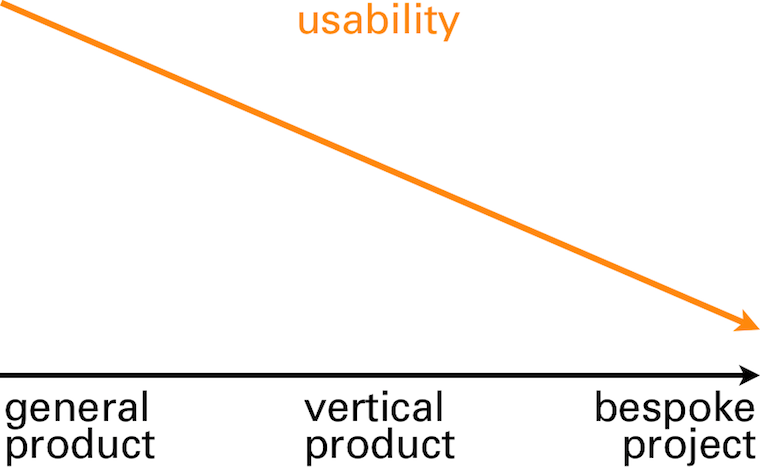
its cause and effect.
clients
The first world we will take a look at is that of clients. This is logical because it is clients who instigate software projects (there are also illogical ways to start a software project—e.g. have to spend the budget before year’s end, ask supplier how—but I will disregard these).
A first client need in software projects is to get ‘it’ built; ‘finished and working.’ This alone is already a cause of many a conflict in software projects. I will show later how to get a much better handle on this issue.
people, get moving
Another client need in software projects is to save money. At least, it used to be in the past decades, when software automated a lot of mechanical, brain‐dead labour, especially in office environments. Additionally, looking at a software project in this way is very spreadsheet‐friendly. The temptation of this should not be underestimated.
But time has moved on and just about all mechanical jobs have been rationalised away. What remains is creating value. This is exactly what people do: deal with situations with flexibility, provide a human touch to communication, solve issues and create new ways to do things. Machines and software do not stand a chance there. Over the years I have made this value creation the core of my design praxis.
intermezzo: what about value?
Let’s take a short detour and see some examples of value creation. We start with a plain project description:
‘We need a new order‐taking system.’
Then we ask where the value is:
‘We need a new order‐taking system, tightly integrated with manufacturing and warehouse operations.’
No, that is not it. That is still a very mechanical description of what needs to be achieved. Try again:
‘We need a new order‐taking system that allows users to unbureaucratically engage with any customer wish.’
There we have it: value. Feels really different than the previous two, doesn’t it? Introducing software that realises this will be of clear competitive advantage to this client.
‘We need a new order‐taking system that allows users to be order makers, instead of order takers.’
Another statement with value; not better, not worse, just different. This demonstrates that defining value is a strategic choice for clients.
Flesh out the two statements above to three paragraphs, answering ‘what is it we are making, who is it for and where is the value?’ and you have what I call a vision. And vision is exactly what I expect from management and leadership in a software project.
back on track
Where were we? Ah, value is definitely a client need in a software project. And by formulating that in a vision statement we have moved to the first thing clients have to offer.
We did already see that clients offer that software projects exists at all. And therefore they have to offer funding, because projects without funding turn out to be sad affairs, in my experience.
tech
The second world that we will take a look at is that of technology, i.e. the in‑house IT department or the external suppliers. All engineers, developers, technical architects, DBAs and functional analysts are part of this world.
Cut to the bone, the sole reason these in‑house IT departments and external suppliers exist is to hoover up those software projects and budgets that clients have to offer. It is their first, and prime, need. This is a marked difference with the world of software products, where technology departments are achievement‐focussed.
XOR
The second need the tech world has is that of clarity. From the zero/one definition of a bit upwards, in black and white terms. What needs to be built and when can we call it finished? This is compounded by the need of the tech world to frame and communicate everything in technical terms.
As such, the tech world is completely at ease working from the statement we have seen before:
‘We need a new order‐taking system, tightly integrated with manufacturing and warehouse operations.’
Given enough time and budget, they can bring this to a good end by themselves. But they are completely lost with the value part in this statement:
‘We need a new order‐taking system that allows users to unbureaucratically engage with any customer wish.’
Yes, the sales types of the tech world will nod understandingly when clients express the value they need. But when the actual work starts, their colleagues will hem and haw until the statement is reduced to something like the first one, i.e. technically precise, but without value.
truly, always
What the tech world has to offer is the engineering and building of software. Everyone knows that in order to get software, it needs to get built, i.e. code developed. The brutal reality of software making is that everything else I describe in this blog post is perceived by clients as optional, even down to the proper engineering part: ‘just bang some code together.’
The tech world expertly plays this ‘you need to get it built’ card. They play it to get (just about) all of the available budget, and to bury deep under the ground anything they don’t ‘feel’ like doing.
users
The last world that we will take a look at is that of users. And here the circle closes, because what users have to offer is value creation. We can now see what software is:
It is a means of value transport, provided by the client and built by technology. The software is there to meet its users, pick up the value they create and bring it back to the client:

But to pick up that value, the users will have to get on the bus. Paying them is not enough, neither is a direct order. These will make them endure the software, but they will not even consider getting on the value bus.
How do you entice users to get on the bus? You do it by observing the needs of these users and addressing them in the software. What are these user needs? Well, that is exactly the question the IT industry has been struggling with for the last 50 years.
Morse code
What happens traditionally in software projects is that (indirectly) the three worlds—client, tech and users—sit down to discuss what users need. It is literally three different worlds meeting, three different cultures, speaking three different languages:
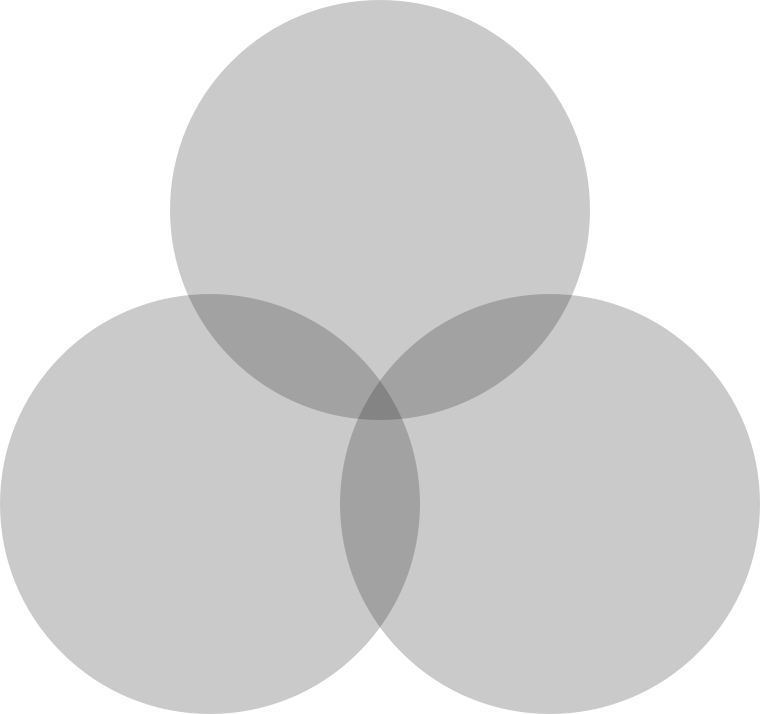
You can see that the intersection of all three is very small. It has a name: discussing features. Features, features, ever more features. A very human phenomenon is feature hoarding. Just like kids and toys, there can never be less features. No, that is a regression.
Everything gets phrased as a feature request—the only means of communication available. Often users are asking that an existing feature gets improved (e.g. finally made findable, or usable), but it gets phrased as an additional feature.
gimme some dough
Features are a commodity, think staple foods like rice, corn and wheat. Sure, not enough and users will starve. But increase supply beyond enough and you have glut. In real life, people’s attention turns to better food when they have enough. In the software world, the need for a better meal is answered by a huge buffet of mediocre food.
The biggest mistake the software industry makes is listening to these feature requests and supply what users want. This is the prime reason supposedly tailor‐made project software ends up being the armpit of usability. Remember, the goal was to find out what users need. There is a solution for this, it is called usability.
intermezzo: what about usability?
Another detour. There are two definitions for the word usability that you have to know:
- Measure of how usable, i.e. fit for use, something is. It is qualitative; this makes the tech world nervous because there is no hard numbers.
- A group of empirical professionals who measure usability and survey user needs. Their general background is psychology. Tech‐splanation: they are specialised in this type of hardware called humans.
This is incredibly useful. Usability professionals can be engaged to deliver an exact map of a software project users’ needs and measure whether software is actually fit for use. The effort and cost of this scales with the size of the project. In general it is peanuts compared to what development hoovers up.
back on track
Where were we? Ah, knowing users’ needs is fully within reach, a question of just do it. Now we need one more thing. We need to connect the world of clients, technology and users; to translate between them and hook up the needs and offers. There is a solution for that, it is called interaction design.
That is what I do as interaction architect. It involves making the plan for the bus. For clients I realise the value transfer; for tech I make clear what needs to be built; for users I ensure their needs are met.
To show how this works I will now present my recommendations for software projects, in nine easy steps:
1. you got to have a vision
Before kicking off a project, even getting that budget, why not make it crystal clear what value is going to be created and formulate a project vision? I help my customers all the time to discuss, clarify, reach consensus and formulate one; this fits nicely in a one‐day workshop.
It serves as a first feasibility check, getting a convincing vision together. And it can be immediately used to ‘sell’ the project internally and get a modest budget for the next steps. Costs involved? One–two man‐days for the workshop.
2. start with user needs
Right here, at the very beginning of the project, is the right moment to get the user needs mapped out. These are already a useful foundation for strategic platform—desktop, browser, tablet and/or smartphone?—and architectural decisions. Why take these without knowing what is needed?
Usability specialists survey and observe your project’s users and bring back the facts. As mentioned, you are still not spending any serious money at this point.
3. integrate usability + interaction
Now is the time to integrate usability and interaction design with your project. This does not happen by itself. The software industry has the tendency to bolt on interaction design somewhere at the bottom of the development pyramid and stick usability research in a drawer. Sorry, but that is not going to help you.
Usability professionals are the only objective partners a client has for knowing what users need and if the software is really working. The interaction architect is the partner for realising your project vision of value creation. Processes will have to change too; you cannot make software like you did ‘last time’ when the results should really not be like last time.
4. design it first
With your vision, user needs and platform choices known, the largest open question of the project—what do we need to build?—can be answered. A first, rough design of the user interaction can be made by an interaction architect (‑team for larger projects).
This will include a solutions model: a large‐scale solution for realising that value creation, plus a design strategy for working out the complete software in detail. This will take the whole project out of the dark, into the light.
It is a good idea to have your prospective tech partners on board during this design stage as discussion partners. Technical feasibility has a profound impact on interaction design. And vice versa: interaction design has the same profound impact on the architecture and design of back‑ends.
5. test it first
Yes, not a line of code needs to be written to find out if the interaction design is meeting your users’ needs—and by extension, if the goals you set for value creation are fulfilled. A usability test with your users can be performed with a paper prototype. I have seen many of these and they simply work.
These tests are practical, quick and lightweight, involving six users, maybe up to twelve if your user group is very heterogeneous. Anything beyond that is project bloat, making it less agile. If you do insist on having it tested on a real computer/tablet/mobile screen, then a prototype can be made. This should take three days, not weeks or longer.
6. refine + test again
The reason we made a rough design in step 4 and performed practical, lightweight testing in step 5 is that we are going to iterate. From the analysis of the tests the interaction architect keeps the parts of the design that work well and redesigns the parts that performed badly.
These changes can be sweeping, because up to now relatively little time, budget and commitment have been invested.
Then it is time for another round of usability testing and it will show that giant step have been taken towards a fully working interaction design. If still any big issues are found, then repeat this step of refinement and test.
7. make interaction spec part of the contract
You still have not spent any serious money up to now. You do have a refined interaction design specification that shows what has to be built. It has been tested to fulfil your users’ needs and to realise your vision of value creation.
Now is the time to take this specification to your tech partners, the in‑house IT department or the external suppliers, and ask for a quote. It will be much easier to provide an estimate on this basis and it will be more accurate. You will also be able to define much better contractually what ‘finished and working’ means.
8. test + test
That’s two different tests. The first one is the usual, functional testing of what is being built. Doing this against the interaction design specification ensures that you get exactly what you expected. Passing these test gives the tech partners an exact moment to call it finished.
The second type of testing is usability testing of alpha versions of the built software. It checks for more subtle usability issues and validates the overall interaction design. Again the interaction architect resolves the issues and refines the design. The project impact of this is low, because all the bigger issues were dealt with before development started.
9. agile? interaction architect is co‑owner
Agile development was invented in + for the world of software projects. Working agile does not change much of the eight steps above. In step 4 one certainly needs to get to a solutions model, to knock the project into shape.
More detailed interaction design can be postponed, to be delivered just‐in‐time for the start of an implementation sprint. Usability tests are performed on the evolving software, as described in step 8.
In the piecemeal work that agile entails, it is very easy to lose track of a coherent user experience, one that meets your users’ needs. Making the interaction architect software co‑owner in the agile process, highly involved in planning of the next sprint and further sprints, solves that.
postscript
And that’s it. I have shown that it is fully possible to set up software projects where the needs of all the parties involved are met. The clients’ need to get it built and for value creation; the tech worlds’ need for clarity on what needs to be built and of when it can be called finished.
Last, it is straightforward to find out what software users’ needs are and to meet them through interaction design. At that point you can build the value bus, one that users are pleased to take, to bring their value home:
 bus symbol from
openclipart.org
bus symbol from
openclipart.org
Labels: architects, design stage, lecture, practical, process, product vision, top story
a survival guide for designing in a service context
10 November 2012, 00:26
The world usability day came early to Berlin this year. Apart from a special date, we also had a special location; the location scouts of the organisation team had worked hard to secure the iconic kalkscheune to receive a record number of visitors.
This year our theme was digital payments & service design. I contributed with a lecture titled simply designing in a service context—a survival guide. You can see the video online (in German), or read it below.
cliffhanger
Thinking about the theme of this world usability day, I asked myself: can I show some complete service design projects? The answer: positively maybe.
Let me explain.
What happens a lot in practice is that we get asked to design the user interaction for a piece of software—an app, website, portal, application, or even for a whole device—and in no time we find out that it is part of a whole service. , i.e. fixed:
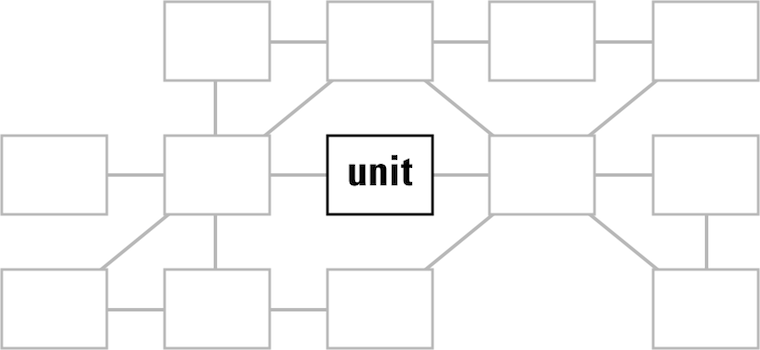
This is of course a rather unfortunate situation and basically a dilemma for interaction architects who are used to seeing the whole picture and shaping it.
rationalisation
There are plain, practical reasons for concentrating on one unit instead of designing the whole service. The first one is hardcore: time = money. In every project I have been involved in in the last two decades, effort—as counted in man‐months—was the bottleneck. Either time or budget was limited, or both. This does not mix easily with shifting the focus to the whole service, which does make a project automatically grow in size.
Besides that, every person has the need to divide a daunting task into ever‐smaller chunks, until these subtasks become small enough to be grasped and worked on in a secure way. Software development is full of this: modules–source files–functions so that developers can do their job, securely. The problem is that once a daunting task—say, a service—has been broken into pieces and grasped, it is hard for most to step back and look at the big picture.
Similarly, every organisation or firm gets divided into ever‐smaller chunks, divisions–departments–teams, so that people actually function. But it also creates fiefs and bureaucracy, with nobody willing or able to take responsibility for a whole service.
‘life is not meant to be easy’
What we can learn from this is that for service design to happen one needs time, stamina and budget; big‐picture thinkers in charge and the will to break departmental borders and bureaucracy. And one needs all of the above, or service design is not going to happen and the work will concentrate on a single software unit, aka catch‑22.
looking in my rear‐view mirror…
Now that we are completely rational, I would like to point out that it does not happen very often that customers say ‘hey, here is a project that is actually part of a whole service.’ Usually interaction architects have to figure that out by themselves. In my experience, that happens pretty fast. Below I will review some of my recent projects to give a glimpse of how that works.
But before we jump in, let me mention that I found the economic definition of service quite helpful to get a grip on the theme. Of the five characteristics, variability is the one that gave me most pause for thought; the fact that a service cannot be cookie‐cutter by definition.
Now on to the examples.
an e‑care portal for a mobile network
This portal is used by customers to configure and renew their contracts, among other things. A mobile network clearly delivers a service, check for instance the intangible and perishable characteristics of it. Another boost to the service design vibe is that multiple platforms/media are part of the mix: websites, call centres, SIMs being delivered in the post, brick‑and‐mortar stores.
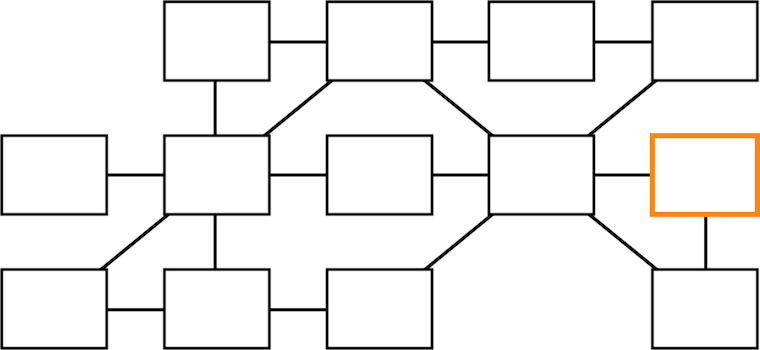
As the highly‐abstracted service view above shows, the e‑care portal in question lives at the far end of the service flow. It is vital to understand its role of regenerating customers in the system, by enabling them to engage with their subscriptions and renew them.
The clear service factor and the multiple platforms/media involved make me say with confidence that we worked here in a service design context.
a startup that will take the pain out of printing
We were asked to have a look at their desktop + mobile printing clients. When we started working with them it became clear that they were delivering a service: keep printing running in companies. Also the multiple platforms/media factor is there, with software and online components, toner delivery and even printers themselves in the mix.
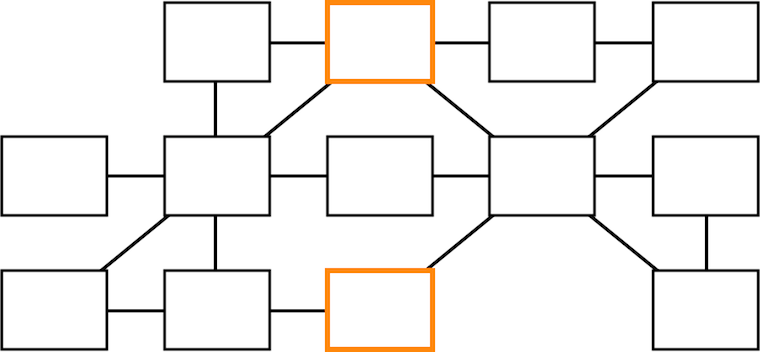
Thus we took the service view and put the printing clients in their proper place, on the sidelines of the service.
an image editor for professionals
One can also take this service thinking too far. This image editing application is tightly integrated with its online manual; there is a registry for plugins, to extend its capabilities with one‐click installation; there is a whole community in online forums around it:
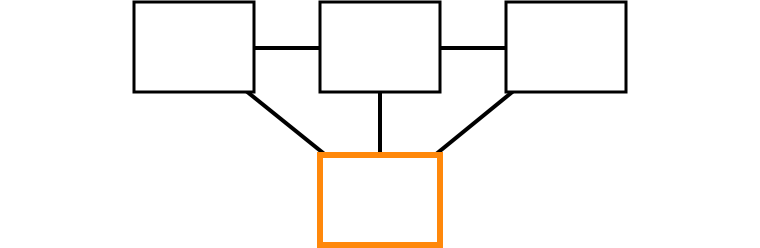
However, the service vibe is not there. This application is not perishable, once you have downloaded it, you’ve got it. It is a tool, you can almost touch it.
Service design is not a cure‑all, not a universal approach to tackle the whole digital world.
a social network for the ad film world
We had already a good look at this one last year. A social network is certainly a service, you may recall how outspoken I am about their perishability and indeed after they decline their is nothing tangible left (also kidding there, folks).

There is an email component in addition to the website, but as is shown above, the overall service is just not complicated enough for me to warrant a service design approach. It is just not worth the effort.
a multi‑SIM mobile phone
This project we have also discussed before, twice. I reviewed it for the heck of it and found something interesting. I was trying to construct some kind of service argument around that this mobile, with its hot‐swap SIM slot, keeps tabs on five different mobile services at the time:
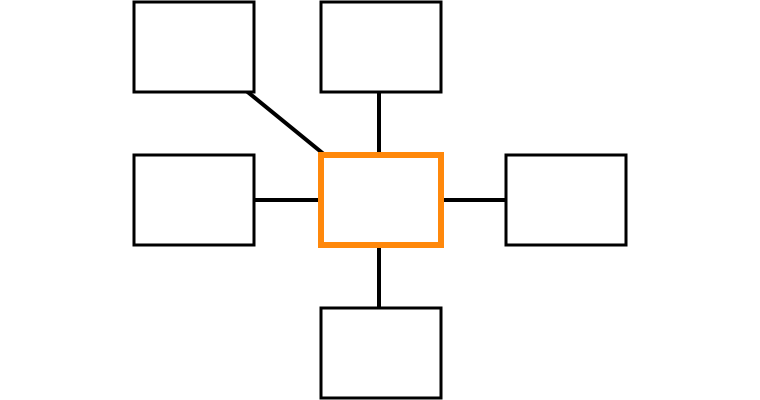
But then realised something else: this is not service design, this is contra‐service design. In a counter move, this product breaks the service tie between mobile network and mobile phone, reducing networks to commodities. It is literally a case of ‘power to the people.’ This is exactly what my team had in mind when we designed its user interaction.
walks like a duck, quacks like a duck
What I conclude from these project reviews is that in order to get in the service mood, I need to encounter a project that has serious service characteristics and has a nice complex structure, which preferably spreads over multiple platforms/media (desktop, online, devices, the real world—the one with humans and buildings).
At the end it is a judgement call—yep, gut feeling—whether the service context is present or not. This reflects the current start of the art, with publications lamenting that there is no such thing as a commonly accepted definition of ‘service, as used in service design.’
This situation reminds me of today’s confusion surrounding the term UX. That has the positive effect of creating the freedom to ‘simply do the right thing’—a source of many an innovation. But this situation is also cynically exploited at the moment and that discredits the movement to get UX at the top of the agenda.
elementary
And now, as promised, the survival guide. To recap, it is about dealing with the catch‑22 situation of concentrating on the user interaction design of a single unit (app, website, portal, application or device) that lives in a service context.
I will now go through the design project phases that I normally use and explain how to scope the design work so that the best is made of the situation—but without ballooning the effort involved.
product phase
The product phase lays the foundation of the project. With compact methods the goals and context are defined, and the whole as‑is situation is evaluated. Here we go:
- product vision
- There is no project without defining what needs to be achieved. A product
vision is a short, sharp statement of the identity of the product; its user
groups (narrowly defined) and the value it should deliver, as defined in a
moderated session by the persons leading the product creation.
- To cut to the chase, the vision we should work against in our catch‑22 project has to be that of the whole service: a service vision. Exactly, this is the moment where the ‘whole service view’ can be locked into the goals of the project, without any extra effort.
- This is also our last chance in the project to find out that a service context is present; if we find out later then we will have to start again from this step, or ignore it and plod on. Luckily the vision session method is 100% made for finding out what it is that we are designing. In the printing startup project that is what happened. As soon as we saw signs of a service context in the vision session, we switched gears and focussed on the service for their vision.
- functionality
- A functionality overview is compiled for two reasons:
- to get to know the project;
- to have checklist of everything that is ‘in the box,’ every point of functionality that has to be given a place in the interaction; the checklist is literally used as such during the design phase.
- For the first point mentioned, it is best to focus on the unit under design, but also go—in a more fleeting manner—through the service context:
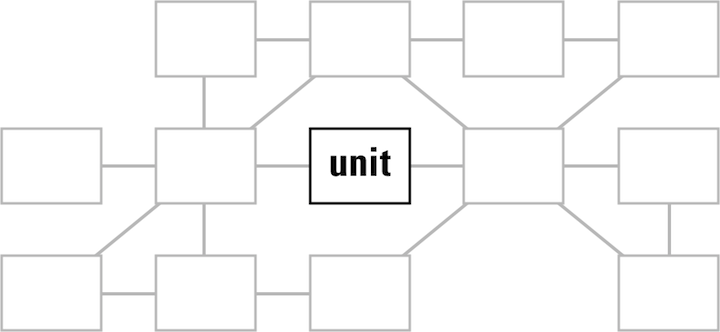
- There is an opportunity here to discuss the relationship of the functionality in our unit and that of the rest of the service, and maybe move some of it around. It is good service design to distribute functionality thoughtfully across the service; i.e. when one platform (web, desktop, devices) covers a functionality point, it may be omitted elsewhere.
- Point number two: when compiling the functionality checklist, simply concentrate on the unit only, in accordance with the project brief.
- user scenarios
- These capture typical and essential use of the product. Imagine a playing
field, with the different ways to use the product spread over its two dimensions.
User scenarios are journeys over the field that show how big and diverse the
field is:
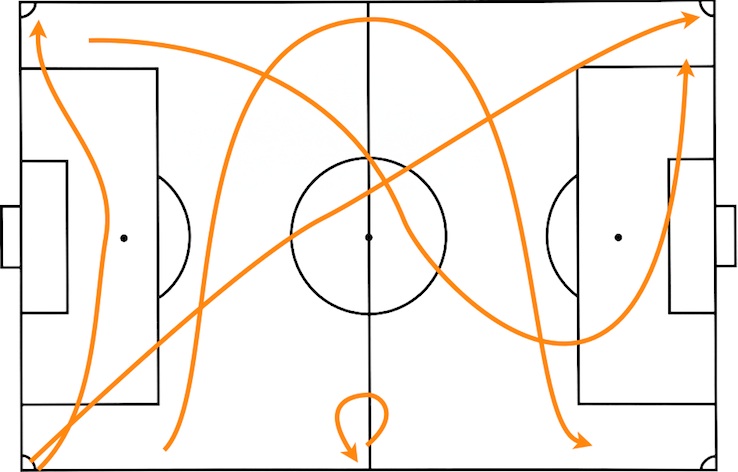
- You can see it doesn’t take many scenarios to cover the whole field. Three is minimal, six is fine and twelve is a good limit for huge, complex products. In our service context it translates like this:
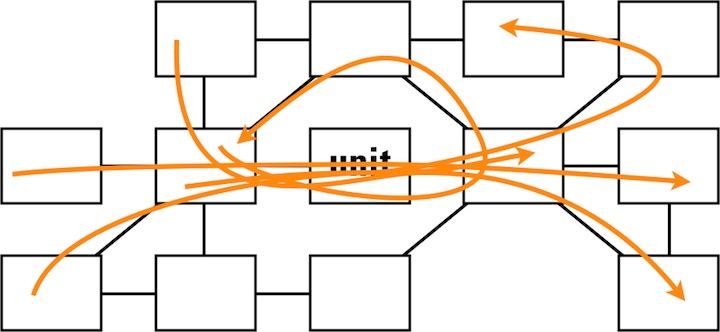
- Every scenario goes through our unit, but they also exercise the typical and essential parts of the service.
- expert evaluation
- The user scenarios are our guide during evaluation. Anything related to
the project—existing software, plans, designs, prototypes, competitors—can
be evaluated: does it fulfil the service vision?
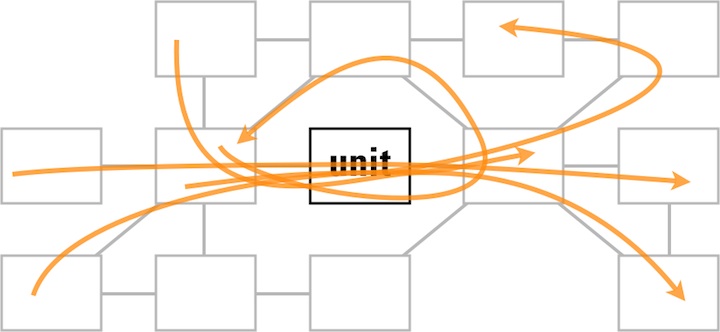
- As shown above, the scenarios make us focus on the unit under design, but also make us evaluate the typical and essential parts of the service.
design stage
The design stage is where we stop looking backwards and start moving forward, to solve the problems found and create the design. Since the bulk of the effort of an interaction design project is found here, there is not so much room anymore to take the whole service into account.
However, the first part of this phase is analysis, which is fully based on the expert evaluation, which in turn is shaped by the user scenarios. These made us focus on the unit, but still guided us through the whole service. Also the service vision was used as a tool during all evaluation and this takes the ‘whole service view.’ Thus the service plays a leading role in our analysis.
the party is over
But when we move on with all further design work we will have to focus on the unit we are designing, exclusively. Remember ‘time = money’? Here is where interaction architects have to be rational and work according to plans and budgets.

All we can do during the whole design stage is to highlight in all communication, with our collaborators and partners, how everything is connected in the service; how choices elsewhere in the service impact our design; how our design decisions create requirements elsewhere in the service.
implementation support
The last component of a design project is implementation support; collaboration with developers and media designers. The point of this is getting the product shipped, while keeping the interaction design together; ensuring that it does not crumble to dust one step at the time during implementation.
Since this is a follow‐through on the design work, we will again have to focus on the unit we are working on, exclusively.
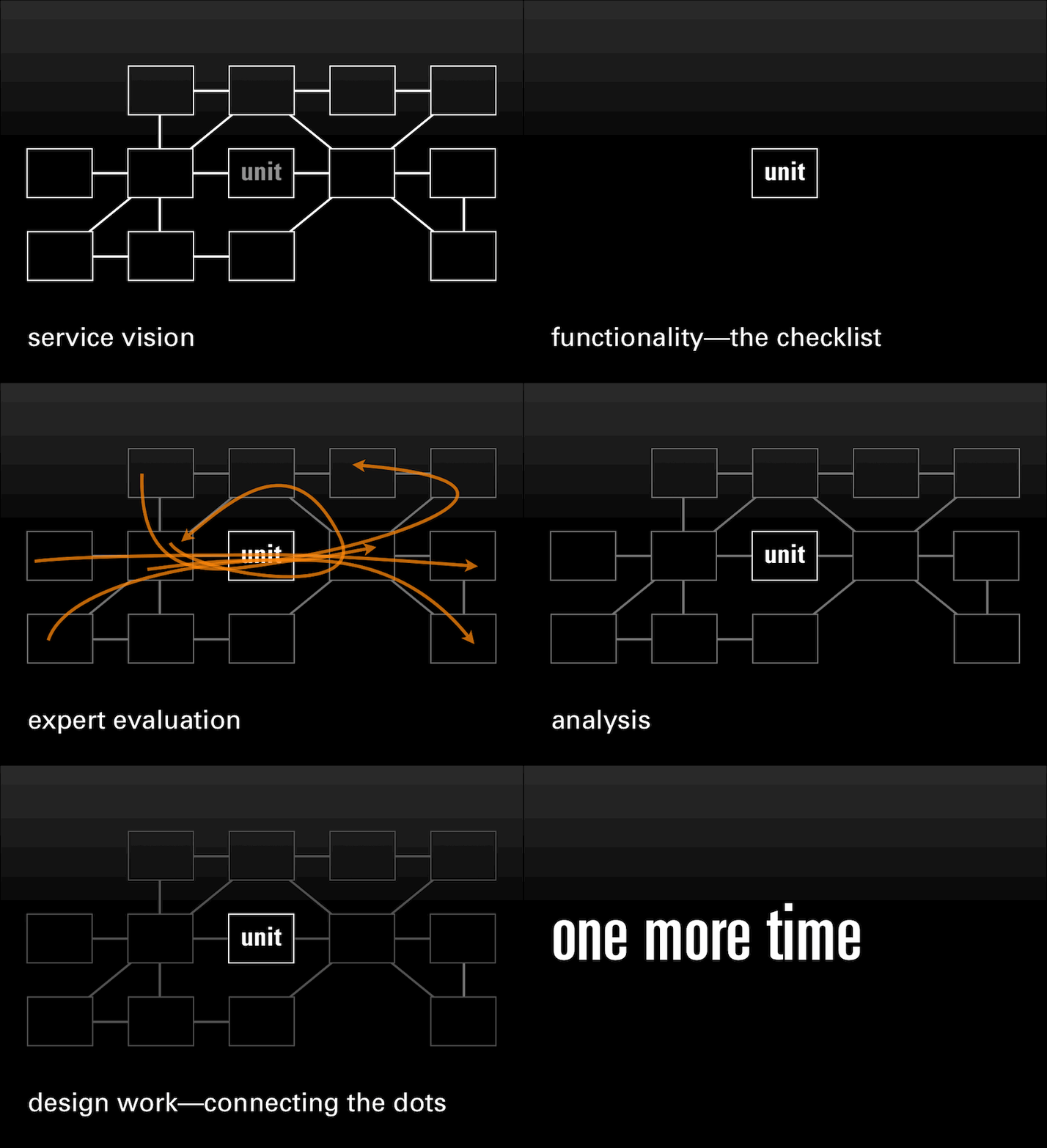
the heartbeat
You can see the steps I just described in the animation below. Notice how the scope of the work pulses throughout the design project (animated gif):
introspection
Now is the time to stop and look back. Did I just present a way to fake a service design project? A way for managers to avoid having to think at the ‘whole service’ level and let interaction architects sort it out, one unit at the time?
Can a project set‑up like this produce OK results? Well, as long as there is an interaction architect on the job who can implement the described steps methodically, that is guaranteed.
Can a project set‑up like this produce good results? That mainly depends on how good the interaction architect is.
Ah, you are looking for great results? Then you need time, stamina and budget; big‐picture thinkers in charge and the will to break departmental borders and bureaucracy. Then a multi‐disciplinary team needs to design the whole service as if it was shaped by a single hand.
Then, you need service design.
Labels: lecture, practical, process, product vision, top story
the wud, on social networks
15 November 2011, 18:10
I have just just wrapped up another world usability day (WUD). The theme was Social Networks and we had a full house—workshops and lecture hall—all day. As mentioned before, I had hands‑on interaction design experience with a sprouting social network to share in my lecture. A video registration (in German) of the full lecture can be seen online and, as usual, here is also my write‑up.
structured visualisation or simply being social, the design work at unusuals.net
We agreed on a ten man‑day consulting project, which was then implemented over a two month period.
With a modest project like this one cannot expect interaction architects to make and document detailed designs (wireframes) of a whole social network website. There is simply not enough time; practical consulting is the most effective way to shape the project. Fortunately, the unusuals were up to the task of wireframing themselves.
just getting started
The work before the work that I do at the start of a project is structuring. At unusuals I implemented the following sequence of methods and phases:
- product vision
- Define of what is it that we are creating; what is the end‑goal.
- functionality
- Create a complete overview of ‘what’s inside the box.’
- user scenarios
- Further work out the vision with scenarios showing typical and essential use. These are then used for…
- expert evaluation
- Evaluate any existing stuff: ideas; plans; designs; software; websites; competing offerings.
- brainstorming
- Time for creativity and generate new ideas. Starting with real life; take it through a couple of loops of fantasy; then back to earth.
- design sessions
- Sit down and solve the design problem at hand. From fundamental stuff like browser sizing and flexible layouts; to mid and detailed design of components like a film gallery.
This may look like a long‐winded process, only getting results at the end (the design sessions). Let’s see whether this was really the case.
panavision
We started—as is my custom—with the product vision phase: defining what the product is, its identity, what the target user groups are and where the value is. This took a couple of hours with unusuals, especially because they had to explain to me the advertising film world.
How many people does it take to make a tv commercial? Easily more than 50. All these people work in a pyramid, in a strict hierarchical system. It is also a world full of freelancers and the name of the game is getting that next job; then recruit the people who work directly below you in the pyramid, within one or two days.
keep on rolling
Two weeks before the WUD, the unusuals kindly agreed to help me prepare by spending two hours recounting the project. During that, they admitted that they did roll their eyes (a bit) when they realised they had to explain the film world to me, an outsider. They themselves have 10–20 years of experience in the business as either producer or director.
But then they also quickly realised, while explaining, that this was helping them, formulating this simplified version to an external. Also my questions helped, always pointing in the same direction: how does this film world tick. Because how it ticks is how the unusuals network should work. And it is the interaction design that defines how it works.
this header has been intentionally left blank
Now I would like to show the unusuals’ product vision to you, but it is simply too strategic. User interaction, being so directly connected to it, is that strategic. But I can share some of the keywords of the vision. unusuals is:
- international
- There are a hundred thousand, or two, people in this industry, worldwide.
- transparent
- The whole point of the network.
- exclusive
- For insiders only.
- a ‘kitchen party’
- Thinking about identity, the unusuals wanted the opposite of industry (awards) events, with its cynical networking. They wanted to have that vibe of a private party at someone’s home, full of film industry mates of course. And the best place to be at a party is… the kitchen.
just can’t get enough
Where it came to functionality, there was already a wall full of post‑its; the proverbial wish list of everything other social networks do, plus some more on top. But luckily there were some moderating factors. There was a fixed (re‑)launch date of mid‑June (real artist ship) and there was also a planning, so they knew they had to do a feature freeze way before June. Apart from that I also encouraged them to focus on the essential, because squeezing it all in would be in direct conflict with achieving great user experience.
And here I must make the unusuals a big compliment. Unlike many other companies, they were able to prioritise functionality, to decide what really mattered. And ensure that that would be designed and implemented to a high standard. They were able to draw on their experience as film makers and translate that to the software maker world.
But also they had a new basis for their decisions upon. They had their product vision. So instead of individuals fighting for their feature, they were a team checking if features were essential for reaching their common goal. The unusuals completed this method as ‘homework.’
internet‐free zone
More homework for the unusuals was writing their user scenarios. I say: six is the magic number for user scenarios. I also had an extra assignment for the unusuals: keep the technology out. No mention of social stuff like poking, liking, following; do not even mention the internet. The focus should be on users and what they are trying to achieve.
Being natural storytellers, the unusuals gave the main character of each scenario a name. Here is a swift impression of a scenario: Pablo searches for information on film‐making companies; Pablo asks his friends for some tips; Pablo looks at films to get inspired; Pablo checks the details of a film company; et cetera. Usually around ten steps like that per scenario. Only human tasks and needs.
fun fun
The unusuals said they had fun boiling an initial fifteen scenarios down to the magic number. Seeing the commonalities between two of them and merging them into one. And they learned about what mattered to users while doing this.
This method overview shows that designing good user interaction did not have to wait until the design session. It started right away, from the first step, discussing the product vision. Let’s now take a look at how those four vision keywords drove the interaction design.
up and away
Starting with international, yes it is a worldwide industry. But it is also very local. That professional is needed here and tomorrow. In real life everybody maintains a local network of contacts for that. And there is a third factor in this paradox: this industry has a penchant for exotic locations. And with that a couple of questions rise:
- What network do you tap while filming on location, far from home?
- When a professional wants to base himself in a new town, how to get started there?
- Even simpler: what do you do when all the usual suspects who can fill a position are busy next week?
The unusuals network is of course the answer. We combined the transparency that it needs to deliver with the local‐but‐international paradox to arrive at a design where one page handles many tasks:
- organic exploring, starting from this user’s own network;
- organic exploring, starting from anybody else’s network;
- organic exploring of the filmmaking market of a city, country or the world;
- recruit people, starting from this user’s own network;
- recruit people, starting from anybody else’s network;
- recruit people within a filmmaking market of a city or country.
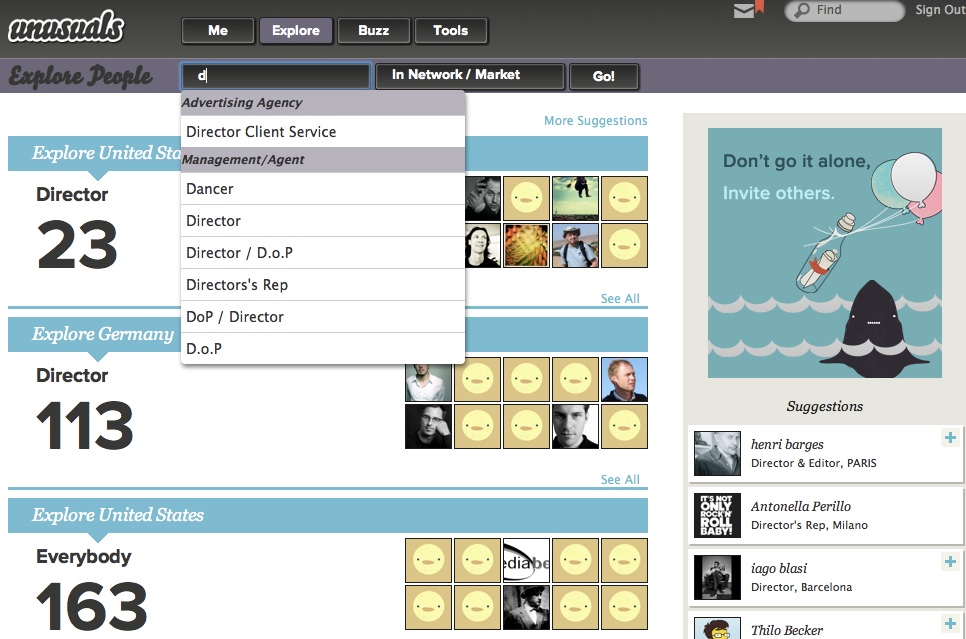
Conventionally this would lead to up to six different web pages, each designed differently and fragmenting the experience. Shown below is how we designed it: in a natural, unified—if at first sight maybe even unspectacular—way. Starting with exploring:
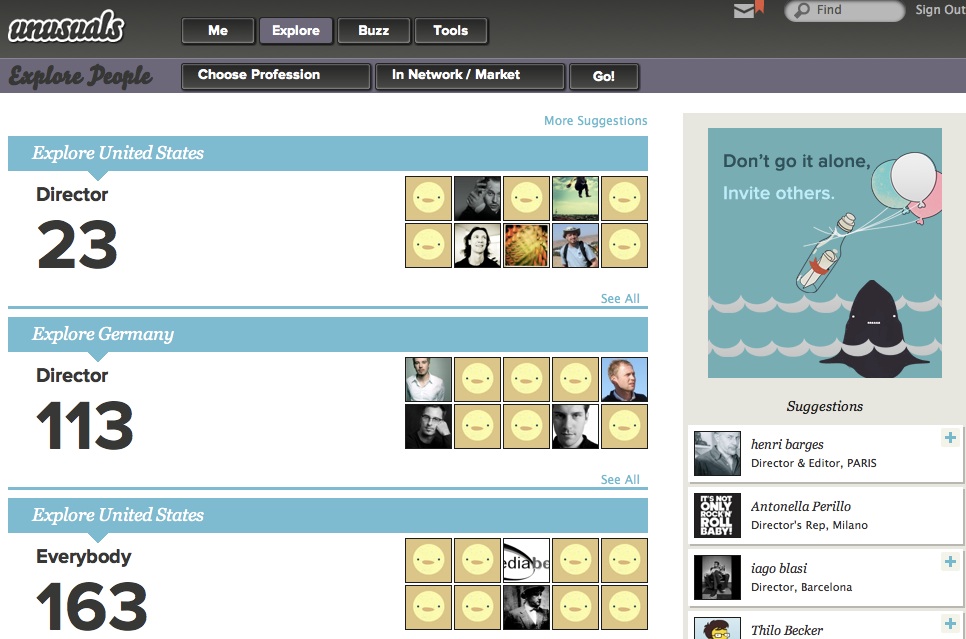
Adding filtering for a certain role:
Or take as starting point the network of people one trusts, or a certain market:
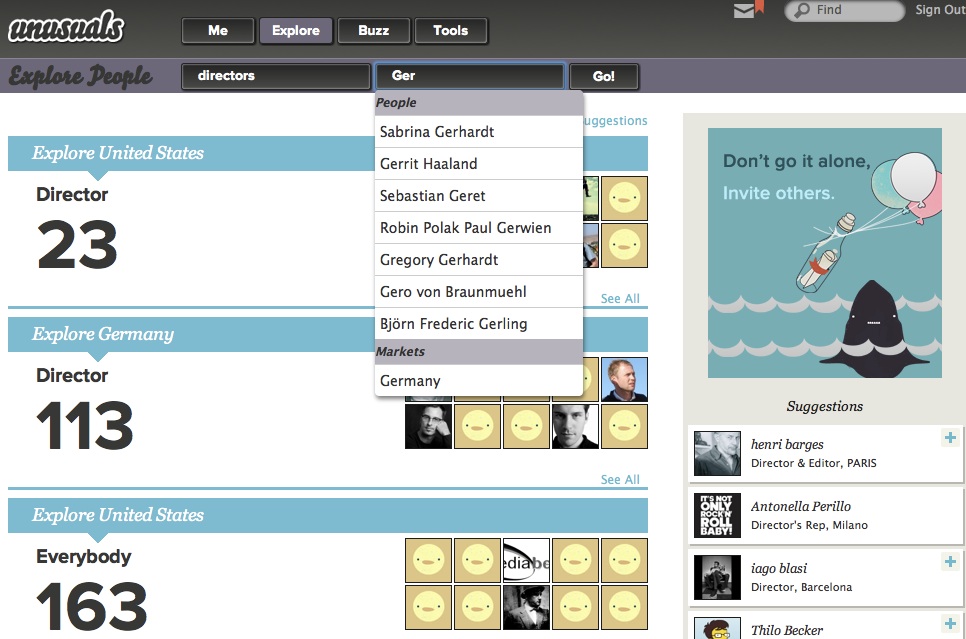
What we see is user interaction shaped by working methodically; combining the product vision, user scenarios and the understanding of how users tick.
splendid isolation
unusuals being an exclusive network is a great thing. It really helps to focus while designing, creating a place where this user group will feel right at home. Which can only help to build the network. But it will also help the network to survive.
What is it that destroys social networks? It is that cool innovators—who are the gravitational force that builds a network—do not want to be seen in the company of people who they consider ‘clowns, jerks and definitely uncool.’ So they leave networks when they feel overrun by these types, adopting a new, hip hangout for themselves. As usual, this is followed by an exponentially rising tide of invites that builds this next network.
lean and mean
My conclusion is that all general networks must die. By which I mean that these networks have the same life cycle as boy bands: every couple of years there is another bunch that dominate the charts. It is just a fashion/trend cycle, driven by these cool innovators.
I believe specialised, exclusive networks have much greater staying power. By keeping out people who are definitely not insiders, reasons to leave can be kept below the threshold of the cool. This why I am happy that the unusuals followed through with keeping it exclusive:
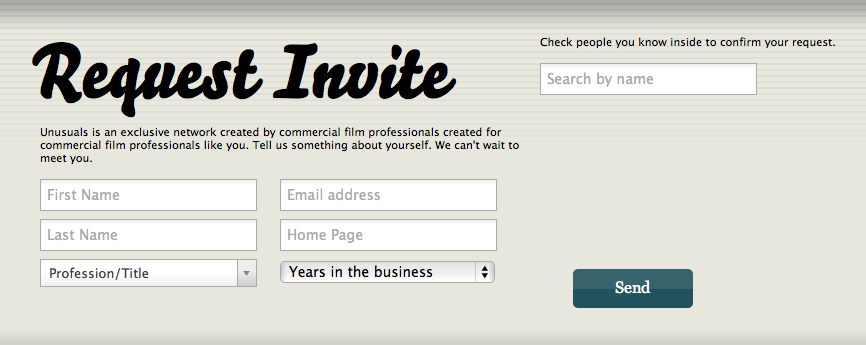
To join unusuals you have to be invited. And to be invited you have prove your credentials. Modelled on real‐life strategies of getting past the doorman of an exclusive club, there is two ways to do it. Either ‘do you know who I am?’ or ‘people are waiting for me inside.’
you can’t touch this
What became of the kitchen party? There is no part of the unusuals site that can be identified as its tangible representation. But as the unusuals pointed out in their feedback, it is everywhere. It certainly got mentioned a hell of a lot throughout the project. That helped with finding the right form while designing and also helped with important decisions.
Having you own offbeat concept like the kitchen party really works like a conspiracy within the design and development team. It does keep everyone pushing in the right direction.
paper + clip
With the kitchen party comes the curious host, who keeps the party going by discreetly asking a question or two to participants and using that to establish new connections and interactions. Again, this is not directly tangible. Do not expect Clippy, the curious host.
Instead, it resulted in a policy: no form‐filling, beyond the bare minimum, like on the request for an invite. There is no duty for users to reveal information about themselves, only opportunities. ‘See that cool sneaker spot? Yeah, I edited that.’ You can then count on the vision of a exclusive, professional network; that users will take the opportunity to profile themselves.
talk talk
And now for some social interaction. Among all that initial functionality on post‑its there was all sorts of communication. Private messaging, group discussions, comments, following, feeds, tweeds, et cetera. Each of these looks ‘easy’ to add. In reality we underestimate the effort because they are ubiquitous, infrastructure type of functionality. We tend to forget about all the details that need to be designed and implemented for each.
Part of my job is to exactly point out these implications. And to show how much work it would be to integrate these with each other, as well as having to explain to users why all these have to exist within unusuals. For example, private messaging is covered well by good old email. No need to duplicate it. It was time for me to say: ‘Pick one. Which form of communication is the most important for your vision?’
crashing the party
Fast forward to a round of brainstorming, where the vision of transparency was combined with a look at how people communicate at a real‐life kitchen parties: two or more people conversing with each other anyone standing close enough can listen in. And anyone who has something to contribute can join the conversation.
That is how conversations were designed at unusuals. Starting with a comment to a film, or person A starting talking to person B. When someone answers it is a conversation, anyone can join to broaden it. Nice detail that there is no ownership of any given conversation, they are simply attached to all persons and content involved.
the right stuff
The best part of this is that the unusuals own this stuff. No, not like in software patents. I mean they worked it out themselves. The worst you can do when developing user interaction is blind copying: ‘facebook has a wall; so must we. They are quite successful.’ Not really much better is the ‘not invented here’ attitude. ‘facebook has a wall; that will not happen to us. We must invent something unique.’
The correct way to develop user interaction is to work through the methods outlined above, beginning with that you’ve got to have a vision. If then your design is quite similar to something already existing, then that is OK. You arrived at it independently, from your own strength.
During the unusuals development period this year, facebook changed the behaviour of its ‘wall.’ Two weeks ago I asked the unusuals what they thought when that happened. They said that they could not care less. They have their own thing, which is right for them and their users. They have their independence.
red carpet day
Further brainstorming produced premieres, of course based on the film business. It solves the problem of how a crew that worked on a film can be kept up to date of the release of said commercial. unusuals lets members schedule a premiere of a new commercial. Those closely involved with its release will do so, out of pride and/or as part of customer service. Via invitations and organic networking the crew gets to hear about the upcoming premiere.
And here the curious host principle pays off. Any member checking out the premiere has to opportunity to put himself with a simple action on the crew list of the film (yes, there is peer review to fight abuse). This action (soft‐)connects the crew: they have worked together. We see again how important content is for starting social interaction and building the network.
quattroporte
The unusuals had a dream. They asked me if the site could feel really simple. Like only needing four departments to structure the whole site. Problem was that at that time their straightforward classification of their functionality called for nine departments. So I thought about it for a short while and the answer is: yes, you can.
There is no standard recipe for achieving this simplification. Solving it is quite an intuitive design process. Full understanding of the product vision and how users tick goes into it and suddenly, it gels. The understanding that exploring the network, keeping up with social activity and users presenting themselves were the most promising categories to put top‑level. Then the functionality overview is used as a work list to check and place everything:
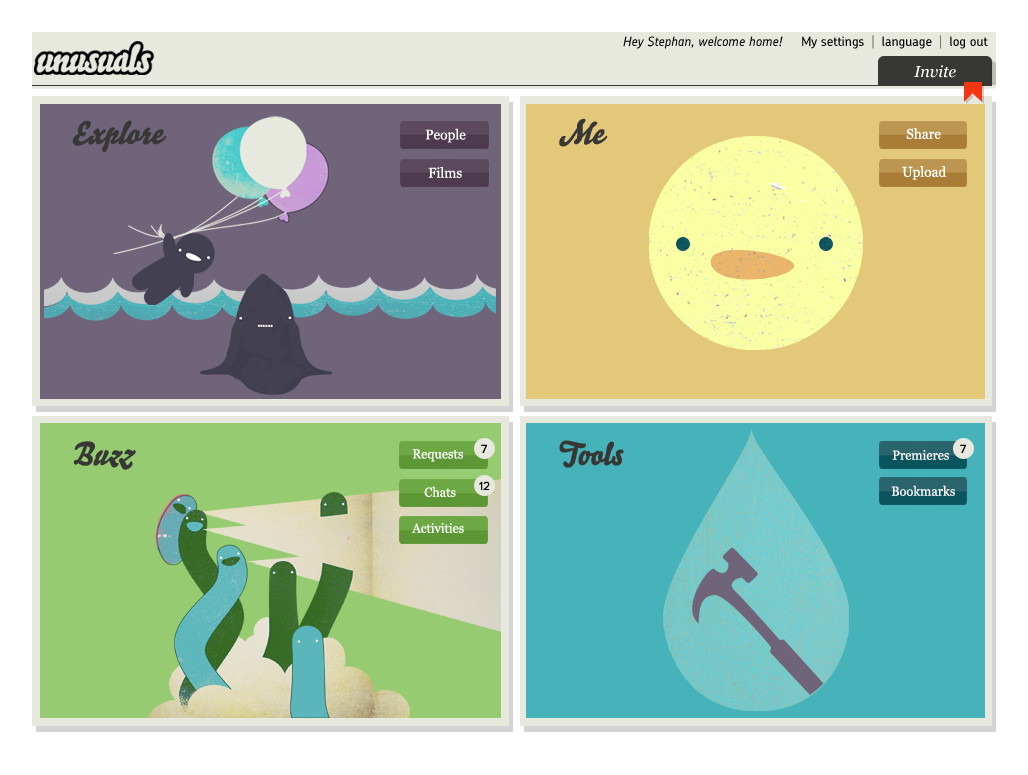
Top‑left is the Explore section we saw before. The Me section is all about this particular user (profile, settings, media uploaded and associated with) and the Buzz covers anything social and dynamic in time. Finally the Tools section offers room to expand. For instance managing premieres belongs there.
get the most out of it
Phew, already a long haul and it still only covers part of what we were able to achieve during this modest, ten man‑day project. So I asked myself: how come the unusuals got so much out of this? I think it is because:
- The unusuals were fully open to process change. Introducing proper interaction design means that things cannot stay as they were before. Because unusuals is a startup it was more a case of process shaping, but still they got it without a need for heavy discussion.
- The unusuals reached out to get a professional on board to work on their user interaction. And they were determined not to go it alone. They kept looking until they found a partner that fitted their needs; then without further ado started our project.
And here we have the acid test. Without these two, really nothing is going to happen. You cannot bolt on some usability or interaction design consulting to the side of you regular development process and expect results. For that they have to become the core of your process. Similarly, doing serious work takes experienced professionals that you trust. When both of these points are not in place, then all that is left is talk, about improving usability and having a great user experience. Read more about process integration—from last year’s WUD.
What also really helped is that at unusuals I was working directly with deciders. People who, without distractions, put their 100% in making the best product they can.
live and learn
A nice aspect of my job is that you always learn something new, it keeps things interesting. What I learned from the unusuals is that especially for startups, structuring is more than half the work—I explored that deeper in a previous blog post. They stressed that they really valued the methodical approach to the project.
The second thing I learned takes that to the next level. The unusuals insisted that the early methods—product vision, functionality, user scenarios—liberated them. They could stop talking about unusuals on other peoples terms, start with a clean sheet and express what and how they wanted to create themselves.
This really bowled me over, I had never looked at it in this way. I use the methods for information transfer and as a solid foundation of the interaction design. That these methods can work emancipating for my clients, well, I keep that in mind from now on.
the ins and outs
The final lesson learned is that a social network like this is a living thing. The growth and dynamic of the network definitely forms another channel of feedback that goes into the evolving interaction design.
Working with the unusuals was a blast. I am proud of what we achieved in such a short time. Normally this would be the point where I say: check it out, unusuals.net. But the chance is high that you are not in the advertising film business. So you won’t get in. But that is actually a good thing.
Labels: lecture, practical, process, product vision, startups
If you like to ask Peter one burning question and talk about it for ten minutes, then check out his available officehours.
 Peter Sikking is an
experienced
Peter Sikking is an
experienced
interaction architect. He unabashedly puts
shipping great products at the centre of his design practice. He is known for
his work for Google, Nokia, the
Metapolator &
GIMP
open source projects,
and startups.
What is Peter up to? See his /now page.
- info@mmiworks.net
- +49 (0)30 345 06 197
- imprint